# クラスルームの読み込み

クラスルームはオンデマンドで読み込むことができます。クラスルームを読み込むことで、現在コンソールにある生徒リストが保存されているクラスルームの生徒に置き換えられます。

<figure><img src="/files/9Ob9x7TVWI5vlOO0r1MS" alt=""><figcaption></figcaption></figure>

1. ［クラスルーム］をクリックします。
2. ［クラスルームの読み込み］をクリックします。
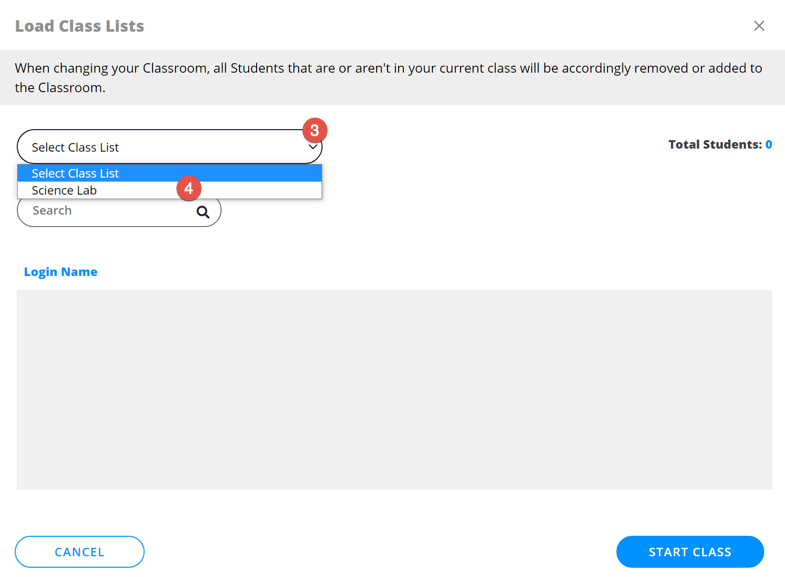
3. ［クラスリストの選択］ドロップダウンリストをクリックします。
4. リストからクラスルームを選択します。

<figure><img src="/files/FjWRiNkmt3I11kABZwQA" alt=""><figcaption></figcaption></figure>

選択したクラスルームの生徒リストが表示されます。［クラスを開始］をクリックします。

<figure><img src="/files/wUlOmMc8gcvb6qRtWSg7" alt=""><figcaption></figcaption></figure>


---

# Agent Instructions: Querying This Documentation

If you need additional information that is not directly available in this page, you can query the documentation dynamically by asking a question.

Perform an HTTP GET request on the current page URL with the `ask` query parameter:

```
GET https://docs.faronics.com/faronics-insight-docs/japanese/faronics-insightwosuru/insight-teacherkonsru/kurasurmu/kurasurmunomimi.md?ask=<question>
```

The question should be specific, self-contained, and written in natural language.
The response will contain a direct answer to the question and relevant excerpts and sources from the documentation.

Use this mechanism when the answer is not explicitly present in the current page, you need clarification or additional context, or you want to retrieve related documentation sections.