# Insight Agentを停止

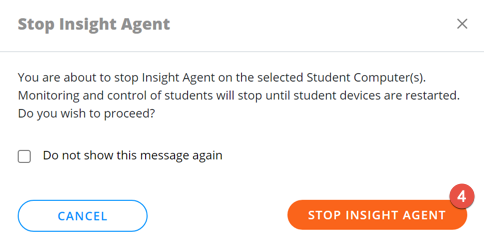
このアクションでは、選択した生徒のコンピュータ上で一時的にInsight Agentを無効化します。これは、標準化されたテストで使用されるセキュアブラウザ等、Insight Studentを削除または一時的に無効にする必要のあるアプリケーションを生徒が使用しなければならない場合に便利です。

有効にされると、Insightアイコンが生徒コンピュータのシステムトレイから消え、生徒のコンピュータが再起動されるまでモニタリングとコントロールが停止されます。

Insight Agentは生徒のコンピュータが再起動した際に自動的に有効になります。

<figure><img src="/files/282uR1m2618Ip2Azd2eX" alt=""><figcaption></figcaption></figure>

1. 少なくとも1人の生徒を選択してください。
2. ［アクション］をクリックします。
3. ［Insight Agentを停止］をクリックします。
4. ［Insight Agentを停止］ボタンをクリックして確定します。

<div align="left"><figure><img src="/files/BsE8BddPlaA0AxBL9wgV" alt=""><figcaption></figcaption></figure></div>

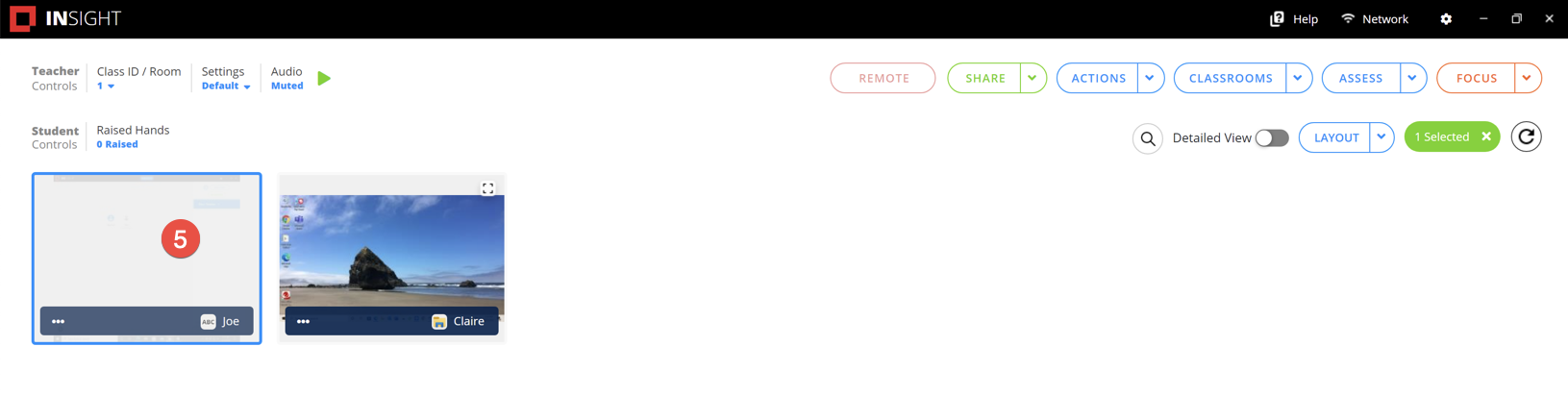
Insight Agentが停止している生徒のコンピュータはクラスには表示されますがグレイアウトされます。

<figure><img src="/files/rsdhDnjYhE9bzcUm0VkH" alt=""><figcaption></figcaption></figure>


---

# Agent Instructions: Querying This Documentation

If you need additional information that is not directly available in this page, you can query the documentation dynamically by asking a question.

Perform an HTTP GET request on the current page URL with the `ask` query parameter:

```
GET https://docs.faronics.com/faronics-insight-docs/japanese/faronics-insightwosuru/insight-teacherkonsru/akushon/insight-agentwo-1.md?ask=<question>
```

The question should be specific, self-contained, and written in natural language.
The response will contain a direct answer to the question and relevant excerpts and sources from the documentation.

Use this mechanism when the answer is not explicitly present in the current page, you need clarification or additional context, or you want to retrieve related documentation sections.