# 保存当前课堂

教师也可以手动将学生添加到当前课堂，并将班级另存为新的课堂。

<figure><img src="/files/rywt108vvI0Z51EADq4K" alt=""><figcaption></figcaption></figure>

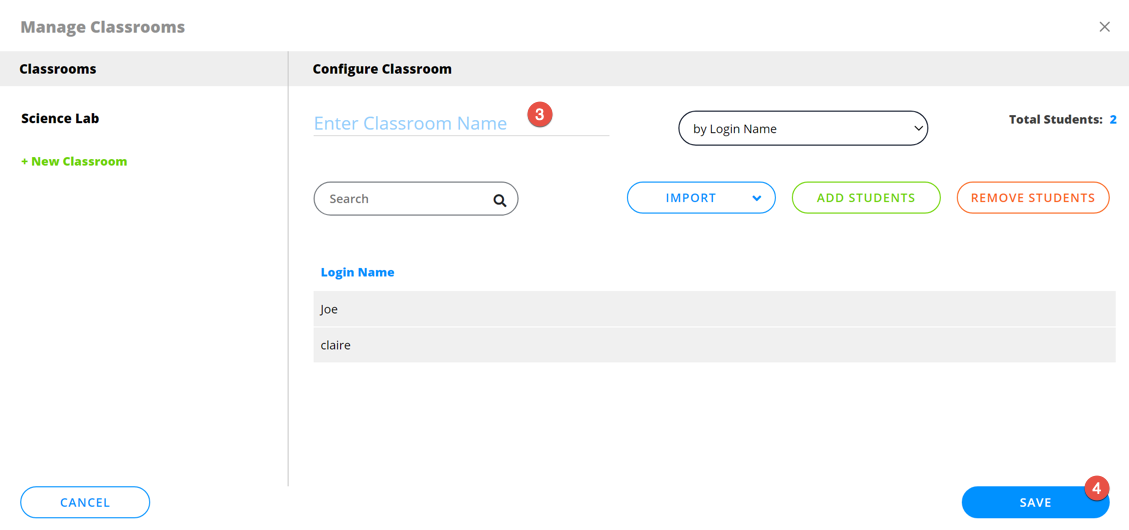
1. 单击"课堂"。
2. 单击"保存当前课堂"。
3. 输入课堂的名称。
4. 单击"保存"。

<figure><img src="/files/AOSfFDyFdDxGfWmOw2WG" alt=""><figcaption><p>保存当前课堂</p></figcaption></figure>


---

# Agent Instructions: Querying This Documentation

If you need additional information that is not directly available in this page, you can query the documentation dynamically by asking a question.

Perform an HTTP GET request on the current page URL with the `ask` query parameter:

```
GET https://docs.faronics.com/faronics-insight-docs/chinese/shi-yong-faronics-insight/insight-teacher-kong-zhi-tai/ke-tang/bao-cun-dang-qian-ke-tang.md?ask=<question>
```

The question should be specific, self-contained, and written in natural language.
The response will contain a direct answer to the question and relevant excerpts and sources from the documentation.

Use this mechanism when the answer is not explicitly present in the current page, you need clarification or additional context, or you want to retrieve related documentation sections.